Tuesday, February 14, 2017

How to Repair a Damaged SD Memory Using SDFormatter


Image


Have you damaged your SD memory? Do not your devices recognize it? Repair it now with SDFormatter. An application with which you will learn how to repair a damaged sd memory and you will get your computers to recognize any memory as bad as it is. 
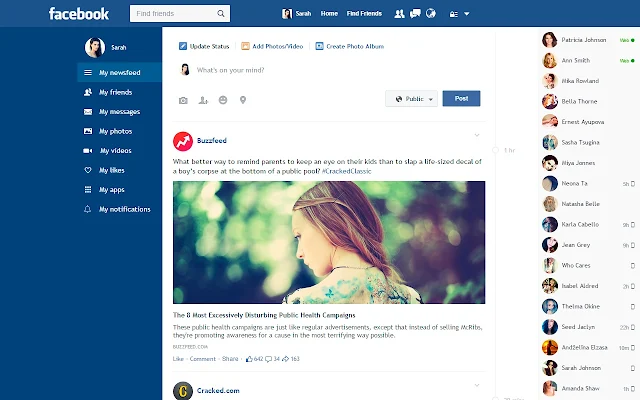


New Flat Facebook Style In Chrome

[​IMG]


Facebook Flat Chrome Extension


We all getting bored with old facebook design, If you think same like me, they try this new facebook look into your facebook account.


(Back Again) Wallet2Bank-Instant Rs.25 On Signup Rs.15 Per Refer(Use in Recharge&Bank Transfer)

Wallet2Bank

Wallet2Bank – Instant Rs.25 On Signup Use in Recharge&Bank Transfer

Wallet2bank Website is Offering Free Rs.25 On SignUp And Rs.10 Per Refer Which can be Utilize To Do Instant Rs.25 Recharge Without Any Cost.


Monday, February 13, 2017

[Back again]UC news REFER AND EARN RS 5000 Love Fund FROM UC NEWS

The UC news app program

Wednesday, February 08, 2017

Windows 7 SP1 Super Lite v2.0 OS [694 MB Only]


INFO

Name: Windows 7 SP1 Super lite v2.0 

OS: Windows Seven 7

Architecture: 32 Bit 

Language: English

Size: 694 Mb

Tuesday, February 07, 2017

The Best Android Emulator For Windows And Mac


Windows 8.1 (AIO) [MEGA Link]

Image

Windows 8.1 (AIO) [MEGA Link] 32/64 Bits | Size: 4.98 GB


Description:


Windows 8 is a version of Microsoft Windows, operating system developed by Microsoft, to be used in PC computers, laptops, tablets and the like. It was definitely released on October 26, 2012, with great expectation, due to the great changes announced.

Sunday, January 29, 2017

Paytm Recharge offers : Free Rs. 20 recharge For New users

Paytm Free rs. 20 Recharge Offer : paytm is offering its new users a free 20₹ recharge,in order to avail this amazing offer,just head to the paytm app on your respective phone platform,signup for your account and initiate a recharge for 20₹,apply the coupon code as FIRST20, The amount payable will get down to zero ,proceed and get your recharge for free.

Saturday, January 28, 2017

Camtasia Studio 9.0.1 Build 1422 Final Full Version 64 BIT

Image

Friday, January 27, 2017

The RECHARGE trick Maxit App Offer: Get Free Rs 100 Paytm/Mobikwik Cash On Sign Up

Hello guys hope you love our daily updates of new loots where you can avail discount products and free recharge apps, So guys we area again back with a new loot offer where you will get Free Rs 100 Paytm/Mobikwik Cash On Sign Up and this offer is given by Mazit App which is run by aditya birla group, One the richest comphany of india. So Guys leave all this just follow few steps to avail Maxit App Mobikwik, Paytm Cash Offer

Wednesday, January 25, 2017

How to Hide Drives in Pc - WINDOWS

What is Drive in Windows?
Drive is a one kind of storage Disk. Such as Local Disk C, D, E, F etc. It is the drive we are access to store the files and datas.

How to Hide Drives in Pc - WINDOWS:

Step 1: First Right Click on Computer to select the Manage.


Mega Apps Collection For Android [700 Apps]


Hello Friend!!

Today This Post Has Bundle Of Android Apps Collection Around 10GB Size

Tuesday, January 24, 2017

Turn off Game Invitations on Facebook

DISCOVER FACEBOOK GAMES INVITATIONS

If there is something that is really annoying, or at least to me it seems to me, are the endless invitations to games that one receives every day in their Facebook account, and as I know that like me there are more people who think the same thing , Today in this new post I'm going to explain how to turn off invitations to games on Facebook.

Monday, January 23, 2017

HIRENS BOOT CD v15.2 from USB 2017 [MEGA]

Image

HIRENS BOOT CD:


Hiren's BootCD is a Live CD with multiple boot sequence, which contains utilities to solve boot failures in computers. This is useful when the primary operating system is not able to start because the Zero or MBR sector of the Hard Disk or Solid State Drive is not spelled correctly or has been lost. Hiren's BootCD has an extensive list of programs. Utilities with similar functionality on the disk are grouped in menus and although they seem redundant, they have differences between them that make them complementary. In the latest versions includes:

Saturday, January 21, 2017

100+ Run commands List


  • Accessibility Options : access.cpl
  • Add Hardware : hdwwiz.cpl
  • Add / Remove Programs : appwiz.cpl
  • Administrative Tools : control admintools
  • Automatic Updates : wuaucpl.cpl
  • Wizard file transfer Bluethooth : fsquirt
  • Calculator : calc
  • Certificate Manager : certmgr.msc
  • Character : charmap
  • Checking disk : chkdsk
  • Manager of the album (clipboard) : clipbrd
  • Command Prompt : cmd
  • Service components (DCOM) : dcomcnfg
  • Computer Management : compmgmt.msc
  • DDE active sharing : ddeshare
  • Device Manager : devmgmt.msc
  • DirectX Control Panel (if installed) : directx.cpl
  • DirectX Diagnostic Utility : dxdiag
  • Disk Cleanup : cleanmgr
  • System Information : dxdiag
  • Disk Defragmenter : dfrg.msc
  • Disk Management : diskmgmt.msc
  • Partition manager : diskpart
  • Display Properties : control desktop
  • Properties of the display (2) : desk.cpl
  • Properties display (tab "appearance") : control color
  • Dr. Watson : drwtsn32
  • Manager vĂ©rirficateur drivers : check
  • Event Viewer : Eventvwr.msc
  • Verification of signatures of files : sigverif
  • Findfast (if present) : findfast.cpl
  • Folder Options : control folders
  • Fonts (fonts) : control fonts
  • Fonts folder windows : fonts
  • Free Cell : freecell
  • Game Controllers : Joy.cpl
  • Group Policy (XP Pro) : gpedit.msc
  • Hearts (card game) : mshearts
  • IExpress (file generator. Cab) : IExpress
  • Indexing Service (if not disabled) : ciadv.msc
  • Internet Properties : inetcpl.cpl
  • IPConfig (display configuration) : ipconfig / all
  • IPConfig (displays the contents of the DNS cache) : ipconfig / displaydns
  • IPConfig (erases the contents of the DNS cache) : ipconfig / flushdns
  • IPConfig (IP configuration cancels maps) : ipconfig / release
  • IPConfig (renew IP configuration maps) : ipconfig / renew
  • Java Control Panel (if present) : jpicpl32.cpl
  • Java Control Panel (if present) : javaws
  • Keyboard Properties : control keyboard
  • Local Security Settings : secpol.msc
  • Local Users and Groups : lusrmgr.msc
  • Logout : logoff
  • Microsoft Chat : winchat
  • Minesweeper (game) : winmine
  • Properties of the mouse : control mouse
  • Properties of the mouse (2) : main.cpl
  • Network Connections : control NetConnect
  • Network Connections (2) : ncpa.cpl
  • Network configuration wizard : netsetup.cpl
  • Notepad : notepad
  • NView Desktop Manager (if installed) : nvtuicpl.cpl
  • Manager links : packager
  • Data Source Administrator ODBC : odbccp32.cpl
  • Screen Keyboard : OSK
  • AC3 Filter (if installed) : ac3filter.cpl
  • Password manager (if present) : Password.cpl
  • Monitor performance : perfmon.msc
  • Monitor performance (2) : perfmon
  • Dialing Properties (phone) : telephon.cpl
  • Power Options : powercfg.cpl
  • Printers and Faxes : control printers
  • Private Character Editor : eudcedit
  • Quicktime (if installed) : QuickTime.cpl
  • Regional and Language Options : intl.cpl
  • Editor of the registry : regedit
  • Remote desktop connection : mstsc
  • Removable Storage : ntmsmgr.msc
  • requests the operator to removable storage : ntmsoprq.msc
  • RSoP (traduction. ..) (XP Pro) : rsop.msc
  • Scanners and Cameras : sticpl.cpl
  • Scheduled Tasks : control schedtasks
  • Security Center : wscui.cpl
  • Console management services : services.msc
  • shared folders : fsmgmt.msc
  • Turn off windows : shutdown
  • Sounds and Audio Devices : mmsys.cpl
  • Spider (card game) : spider
  • Client Network Utility SQL server : cliconfg
  • System Configuration Editor : sysedit
  • System Configuration Utility : msconfig
  • System File Checker (SFC =) (Scan Now) : sfc / scannow
  • SFC (Scan next startup) : sfc / scanonce
  • SFC (Scan each dĂ©marraget) : sfc / scanboot
  • SFC (back to default settings) : sfc / revert
  • SFC (purge cache files) : sfc / purgecache
  • SFC (define size CAHC x) : sfc / cachesize = x
  • System Properties : sysdm.cpl
  • Task Manager : taskmgr
  • Telnet client : telnet
  • User Accounts : nusrmgr.cpl
  • Utility Manager (Magnifier, etc) : utilman
  • Windows firewall (XP SP2) : firewall.cpl
  • Microsoft Magnifier : magnify
  • Windows Management Infrastructure : wmimgmt.msc
  • Protection of the accounts database : syskey
  • Windows update : wupdmgr
  • Introducing Windows XP (if not erased) : tourstart
  • Wordpad : write
  • Date and Time Properties : timedate.cpl

Our Channel

Blog Archieve